- pdfsam-basic-6.0.5-linux-x64.tar.gz96.5 MB8.3k downloads
- pdfsam-basic-6.0.5-macos-arm64.dmg93.6 MB100k downloads
- pdfsam-basic-6.0.5-macos-arm64.zip91.8 MB4.2k downloads
- pdfsam-basic-6.0.5-macos-x64.dmg95.2 MB29k downloads
- pdfsam-basic-6.0.5-macos-x64.zip93.1 MB4.2k downloads
- pdfsam-basic-6.0.5-windows-x64.msi93.8 MB529k downloads
- pdfsam-basic-6.0.5-windows-x64.zip92.3 MB29k downloads
- pdfsam-basic_6.0.5-1_amd64.deb96.5 MB11k downloads
PDFsam download: PDFsam Basic, the free open source PDF editor for pages
Short answer
The PDFsam download most people want is PDFsam Basic, the free, AGPL-licensed desktop app that merges, splits, extracts, mixes and rotates PDF pages. On Windows, press Win+R, paste the winget command from the box and press Enter, or download pdfsam-basic-6.0.5-windows-x64.msi from GitHub. Nothing is uploaded; it works offline.
- Free and open source (AGPL), no watermark, no account
- Merge, split, extract, mix and rotate PDF pages offline
- Windows, macOS and Linux, with Java built in
By Open Source PDF Editor editorial teamChecked against PDFsam Basic 6.0.5, released August 5, 2026
- Independent guide · not affiliated with Sober Lemur S.r.l.
- Free and open source · AGPL-3.0, Windows, macOS, Linux
- Latest release 6.0.5 · August 5, 2026, official files
Install PDFsam Basic 6.0.5
Windows
Paste into the Run box (Win+R), PowerShell or Windows Terminal:
winget install -e --id PDFsam.PDFsam --accept-source-agreements --accept-package-agreements- Press Win+R
- Paste with Ctrl+V
- Press Enter
Package: winget package PDFsam.PDFsam, which installs the official PDFsam Basic MSI from GitHub.
Or download the file directly from the official release:
Download Windows x64 MSIAlso on this release: Windows x64 ZIP (no installer)
Verify the download (SHA-256)
GitHub publishes this hash for pdfsam-basic-6.0.5-windows-x64.msi. It must match exactly.
956c37e2bbb1ac8af73f6aa2bc1dc651d457274221522e27e512d725b703f002PowerShell: Get-FileHash .\pdfsam-basic-6.0.5-windows-x64.msi -Algorithm SHA256
64-bit (x64) Windows. Java is bundled with the app, so nothing else is needed. Installs for all users to C:\Program Files\PDFsam Basic.
macOS
Paste into Terminal, with Homebrew installed:
brew install --cask pdfsam-basicPackage: Homebrew cask pdfsam-basic, which downloads the official DMG from GitHub.
Or download the file directly from the official release:
Download macOS DMG for Apple siliconAlso on this release: macOS DMG for Intel Macs
Verify the download (SHA-256)
GitHub publishes this hash for pdfsam-basic-6.0.5-macos-arm64.dmg. It must match exactly.
61a1644dbe71b063e8b302c430e4285daf29c8013bdd729e7c3592cf9d0a915aTerminal: shasum -a 256 pdfsam-basic-6.0.5-macos-arm64.dmg
Apple silicon DMG by default; Intel Macs take the x64 DMG. Drag PDFsam Basic to Applications.
Linux
Paste into a terminal, in the folder with the downloaded .deb:
sudo apt install ./pdfsam-basic_*_amd64.debPackage: the official .deb from the GitHub release, installed with apt so dependencies resolve.
Or download the file directly from the official release:
Download Debian and Ubuntu .deb (x64)Also on this release: Linux x64 tar.gz for other distributions
Verify the download (SHA-256)
GitHub publishes this hash for pdfsam-basic_6.0.5-1_amd64.deb. It must match exactly.
99cf8fc0ea49dadc3420e2b4989358b02089f762cd9f8d9ef17ea53da2779919Terminal: shasum -a 256 pdfsam-basic_6.0.5-1_amd64.deb
64-bit Debian, Ubuntu or a derivative for the .deb; the tar.gz runs on other distributions. Installs to /opt/pdfsam-basic.
Every file comes from github.com/torakiki/pdfsam, the project's own v6.0.5 release, unmodified.
How do I install PDFsam Basic on Windows?
Use the winget command in the install box; it fetches the official MSI from GitHub and checks its SHA-256. It takes five steps: copy the install command, open the Run box, paste and run, approve the prompt and open PDFsam Basic.
- Copy the install command. Click Copy in the install box to copy the winget command for PDFsam Basic.
- Open the Run box. Press Win+R on the keyboard.
- Paste and run. Press Ctrl+V, then Enter. A window opens, downloads the official MSI and installs it.
- Approve the prompt. Click Yes on the User Account Control prompt; PDFsam Basic installs for every user of the PC.
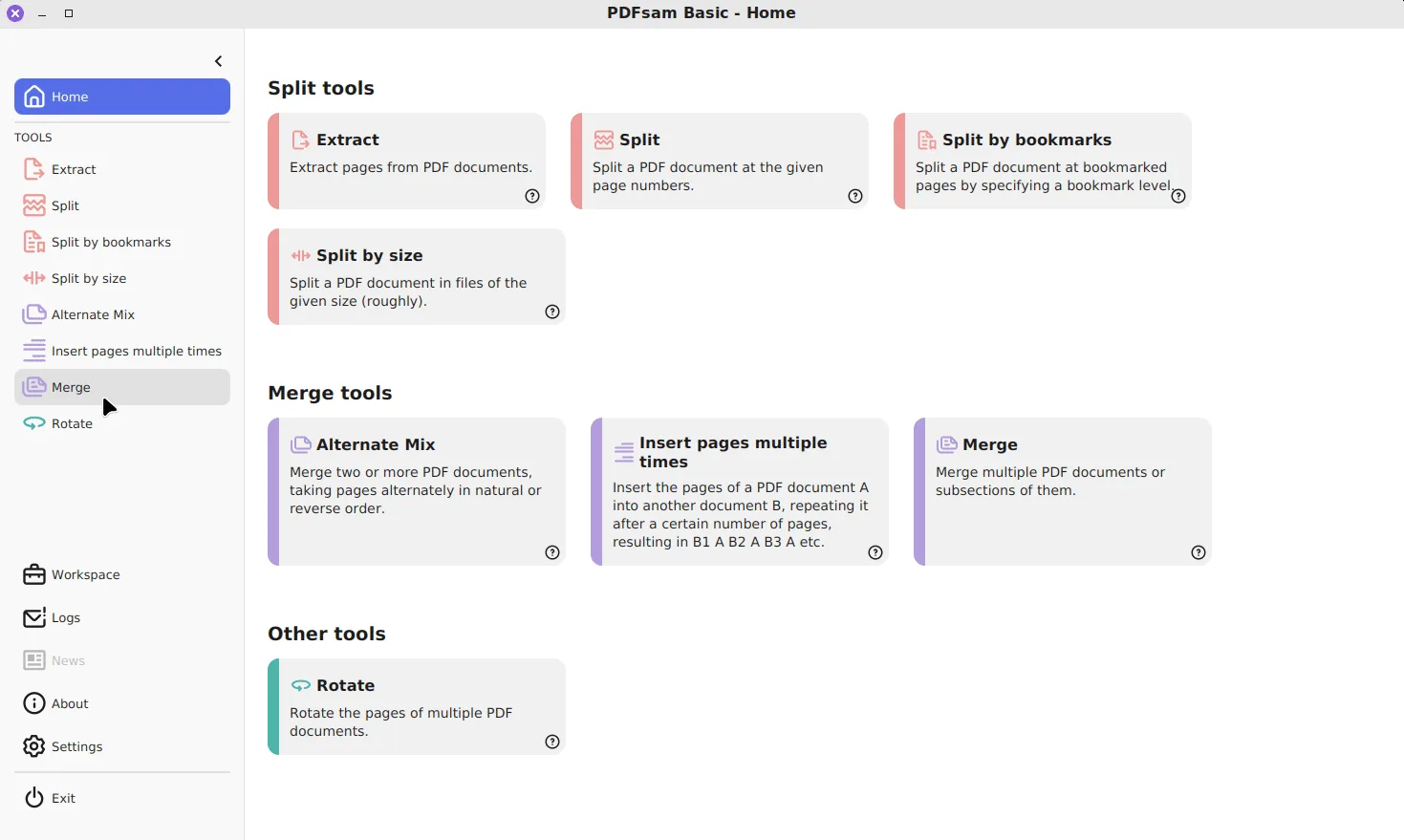
- Open PDFsam Basic. Find PDFsam Basic in Start, pick a tool on its Home screen and drag your PDFs in.
The same command works in PowerShell or Windows Terminal if you want to watch the output. winget runs the MSI silently with SKIPTHANKSPAGE=Yes, so no browser tab opens at the end. If Windows says winget is not recognized, the PC lacks Microsoft's App Installer; the winget setup guide fixes that, or you can download the MSI directly. The Windows download page lists every file with its SHA-256.
What is PDFsam Basic?
PDFsam Basic (PDF Split And Merge) is a desktop program for rearranging PDF files: it joins them, cuts them apart, pulls pages out and turns pages around. It is published by Sober Lemur S.r.l., and the source code for every release is on GitHub as torakiki/pdfsam. Since version 3 it has been licensed under theGNU AGPL v3, which is why it costs nothing, adds no watermark and needs no registration, even at work.
Free and open source
GNU AGPL v3; the whole Basic edition is public code, with no trial period and no page limit.
Eight page tools
Merge, Split, Split by bookmarks, Split by size, Extract, Rotate, Alternate Mix and Insert pages multiple times.
Local and offline
Your PDFs never leave the computer, and Java 25.0.4 is bundled, so there is nothing else to install.
You use it in the same way for every job: pick a tool on the Home screen, drag PDFs into its list, set the options, choose where the output goes and click Run. New files get the prefix PDFsam_ by default, so the originals are never overwritten unless you ask for that.
Which install route should I choose?
All Windows routes install the same program into C:\Program Files\PDFsam Basic, so the choice is about convenience. The Run-box command is quickest and gives you a one-line update later. The MSI suits a PC without winget, and the ZIP runs without installing anything. Macs and Linux PCs have their own files on the same GitHub release.
| Route | Command or file | Best for |
|---|---|---|
| winget (Run box) | winget install -e --id PDFsam.PDFsam | Fastest on Windows; later updates with winget upgrade |
| Windows x64 MSI | pdfsam-basic-6.0.5-windows-x64.msi, 93.8 MB | Any 64-bit Windows PC without winget, or IT deployment |
| Windows x64 ZIP | pdfsam-basic-6.0.5-windows-x64.zip | Running without installing, for example from a USB stick |
| macOS | brew install --cask pdfsam-basic or pdfsam-basic-6.0.5-macos-arm64.dmg | Apple silicon; Intel Macs take the x64 DMG |
| Linux | pdfsam-basic_6.0.5-1_amd64.deb or the tar.gz | Debian and Ubuntu (.deb); other distributions (tar.gz) |
Files from the v6.0.5 release; package from the PDFsam.PDFsam manifest.
Whichever you pick, get it from GitHub, pdfsam.org, winget or Homebrew. The file chooser explains how to tell an Apple silicon Mac from an Intel one, and the Mac and Linux page covers the DMG, the .deb and the tar.gz.
What can PDFsam Basic do with a PDF?
PDFsam Basic works on whole pages. It never re-renders text or images, so the pages you get out look exactly like the pages you put in. The table lists its eight tools and the guide for each one.
| Tool | What it does | Guide |
|---|---|---|
| Merge | Joins whole PDFs or page ranges into one file, with options for bookmarks, forms and a table of contents | Merge PDF files |
| Split | Cuts a PDF after given page numbers, every n pages, or after odd or even pages | Split a PDF |
| Split by bookmarks | Cuts at the bookmarks of a chosen level, such as each chapter | Split by bookmarks |
| Split by size | Cuts into files of roughly a given size in KB or MB | Split by size |
| Extract | Copies chosen pages, such as 2-4,7, into a new PDF | Extract pages |
| Rotate | Turns all, odd, even or selected pages by 90 or 180 degrees | Rotate a PDF |
| Alternate Mix | Interleaves pages from two or more PDFs, in natural or reverse order | Mix scanned sides |
| Insert pages multiple times | Repeats the pages of one PDF every n pages of another | Insert repeated pages |
Tool list from the PDFsam Basic module list at v6.0.5.
Every tool can also set the output PDF version and the compression of the output file. The default is Compress, which packs the file's internal streams; it is not the same as shrinking images, so a scanned PDF stays roughly the same size.
How does PDFsam Basic compare with other free PDF mergers?
Among the free PDF mergers people download for a PC, PDFsam Basic is the only open source one. PDF24 Creator and PDFgear are free closed-source freeware with extra tools such as OCR, and Adobe Acrobat merges files only in its paid plans. The licences below are the ones each package declares in its winget manifest.
| App | Merge price | Licence (winget manifest) | Desktop platforms |
|---|---|---|---|
| PDFsam Basic | Free | AGPL-3.0, open source | Windows, macOS, Linux |
| PDF24 Creator | Free | Proprietary freeware | Windows |
| PDFgear | Free | Proprietary freeware | Windows, macOS |
| Adobe Acrobat | Paid Standard or Pro plan | Proprietary | Windows, macOS |
Licences from the PDFsam.PDFsam, PDF24Creator, PDFgear and Acrobat Reader manifests, read 29 September 2026; Acrobat plans from Adobe.
The free PDF merger comparison adds installer sizes we measured, when each rival is the better pick, and the open source PDF editors worth knowing. Head-to-head pages cover PDF24 Creator, Adobe Acrobat and the publisher's own paid editions.
Is PDFsam Basic an open source PDF editor?
It is an open source editor for the pages of a PDF, not for what is written on them. It will reorder, remove, split and combine pages, but it will not change a word of text, redact, sign or recognise text in a scan. Those jobs are in the publisher's paid PDFsam Enhanced, which is not open source. The Basic, Visual and Enhanced comparison shows exactly where the line falls, so you know before downloading whether Basic covers your job.
Is PDFsam Basic safe to download?
Yes, from an official source. The winget package fetches pdfsam-basic-6.0.5-windows-x64.msi from the torakiki/pdfsam GitHub release and checks its SHA-256 before installing, and every file on the release has a detached .asc signature. Two things surprise new users: by default the app checks for updates and news at startup and shows cards for paid premium features. Both can be switched off in Settings. The safety guide covers what the app sends and the download check shows how to verify the file.
How do I update or remove PDFsam Basic?
Run winget upgrade -e --id PDFsam.PDFsam, or download the newest MSI and run it over the old copy; the installer replaces the previous version. To remove it, open Settings → Apps → Installed apps and uninstall PDFsam Basic, which leaves your PDFs untouched. Version 6.0.5 came out onAugust 5, 2026; the releases page lists what changed in each recent version.
Where are the official PDFsam Basic releases?
All releases on GitHubEvery official PDFsam Basic build is published on the project's GitHub releases page. Version 6.0.5 came out on August 5, 2026; the figures below come from the GitHub API at build time.
- GitHub stars
- 4,591
- Downloads, last 3 releases
- 1.1M
- Latest version
- 6.0.5
6.0.4
v6.0.4
- pdfsam-basic-6.0.4-linux-x64.tar.gz96.5 MB4k downloads
- pdfsam-basic-6.0.4-macos-arm64.dmg94.0 MB43k downloads
- pdfsam-basic-6.0.4-macos-arm64.zip92.1 MB2k downloads
- pdfsam-basic-6.0.4-macos-x64.dmg95.6 MB13k downloads
- pdfsam-basic-6.0.4-macos-x64.zip93.4 MB1.9k downloads
- pdfsam-basic-6.0.4-windows-x64.msi93.7 MB292k downloads
- pdfsam-basic-6.0.4-windows-x64.zip92.2 MB13k downloads
- pdfsam-basic_6.0.4-1_amd64.deb96.5 MB4.8k downloads
6.0.3
v6.0.3
- pdfsam-basic-6.0.3-linux-x64.tar.gz96.5 MB386 downloads
- pdfsam-basic-6.0.3-macos-arm64.dmg94.0 MB1.2k downloads
- pdfsam-basic-6.0.3-macos-arm64.zip92.1 MB58 downloads
- pdfsam-basic-6.0.3-macos-x64.dmg95.6 MB446 downloads
- pdfsam-basic-6.0.3-macos-x64.zip93.4 MB42 downloads
- pdfsam-basic-6.0.3-windows-x64.msi93.7 MB11k downloads
- pdfsam-basic-6.0.3-windows-x64.zip92.2 MB759 downloads
- pdfsam-basic_6.0.3-1_amd64.deb96.5 MB147 downloads
Counts come from the GitHub API, refreshed daily, and only cover the v* tags shown here. Package managers (winget, Homebrew, Snap, Flathub) and app stores are not included.
Frequently asked questions
Is PDFsam Basic really free?
Yes. PDFsam Basic is free and open source under the GNU AGPL v3, with no watermark, no page limit and no account. The same publisher sells PDFsam Visual and PDFsam Enhanced, which are separate paid programs.
Is PDFsam a full PDF editor?
PDFsam Basic edits the structure of PDFs: it merges, splits, extracts, rotates and mixes pages. It does not change the text or images on a page, fill forms by hand or run OCR.
Does PDFsam Basic upload my files?
No. Every tool runs on your own computer and writes new files next to the originals. The only network traffic is the optional startup check for updates, news and premium feature cards.
How big is the PDFsam download?
The current Windows MSI, pdfsam-basic-6.0.5-windows-x64.msi, is 93.8 MB, because it bundles its own Java runtime. You do not need to install Java separately.