PDFsam Basic, the open source PDF editor, is on its way
PDFsam Basic 6.0.5 is on its way from the official GitHub release. The next hour: finish the install, choose which startup checks to keep, and try Merge, Split and Extract on copies of your PDFs.
By Open Source PDF Editor editorial teamChecked against PDFsam Basic 6.0.5, released August 5, 2026
Download PDFsam Basic 6.0.5
Pick your system. The button downloads the file for it from GitHub.
Windows
Download Windows x64 MSIPrefer the command line? Paste into the Run box (Win+R), PowerShell or Windows Terminal:
winget install -e --id PDFsam.PDFsam --accept-source-agreements --accept-package-agreements- Press Win+R
- Paste with Ctrl+V
- Press Enter
64-bit (x64) Windows. Java is bundled with the app, so nothing else is needed. Installs for all users to C:\Program Files\PDFsam Basic.
macOS
Download macOS DMG for Apple siliconPrefer the command line? Paste into Terminal, with Homebrew installed:
brew install --cask pdfsam-basicApple silicon DMG by default; Intel Macs take the x64 DMG. Drag PDFsam Basic to Applications.
Linux
Download Debian and Ubuntu .deb (x64)Prefer the command line? Paste into a terminal, in the folder with the downloaded .deb:
sudo apt install ./pdfsam-basic_*_amd64.deb64-bit Debian, Ubuntu or a derivative for the .deb; the tar.gz runs on other distributions. Installs to /opt/pdfsam-basic.
What should you do in the first hour?
PDFsam Basic pays off once it has handled a real job on copies. These six steps get you there, in the order that avoids redoing anything. The Windows download page and the Mac and Linux page have the longer walkthrough for each system.
Showing steps for your system. Switch:
- Finish the installer. Windows: Open the downloaded MSI and approve the Windows prompt. PDFsam Basic installs for all users to C:\Program Files\PDFsam Basic, with Java included, and adds a Start menu entry. macOS: Open the DMG and drag PDFsam Basic into Applications. Pick the arm64 DMG on Apple silicon and the x64 DMG on an Intel Mac. Linux: In a terminal in your Downloads folder, run sudo apt install ./pdfsam-basic_*_amd64.deb. The app lands in /opt/pdfsam-basic with its own Java runtime.
- Open it and read the Home screen. Start PDFsam Basic. The Home screen shows eight tools in three groups: Split tools, Merge tools and Other tools. Everything runs on your computer and nothing asks for an account.
- Decide on the startup checks. By default the app checks for updates and news at startup and shows cards for paid premium features. Open Settings and untick Check for updates at startup, Check for news at startup or Show premium features if you want a quieter, offline start.
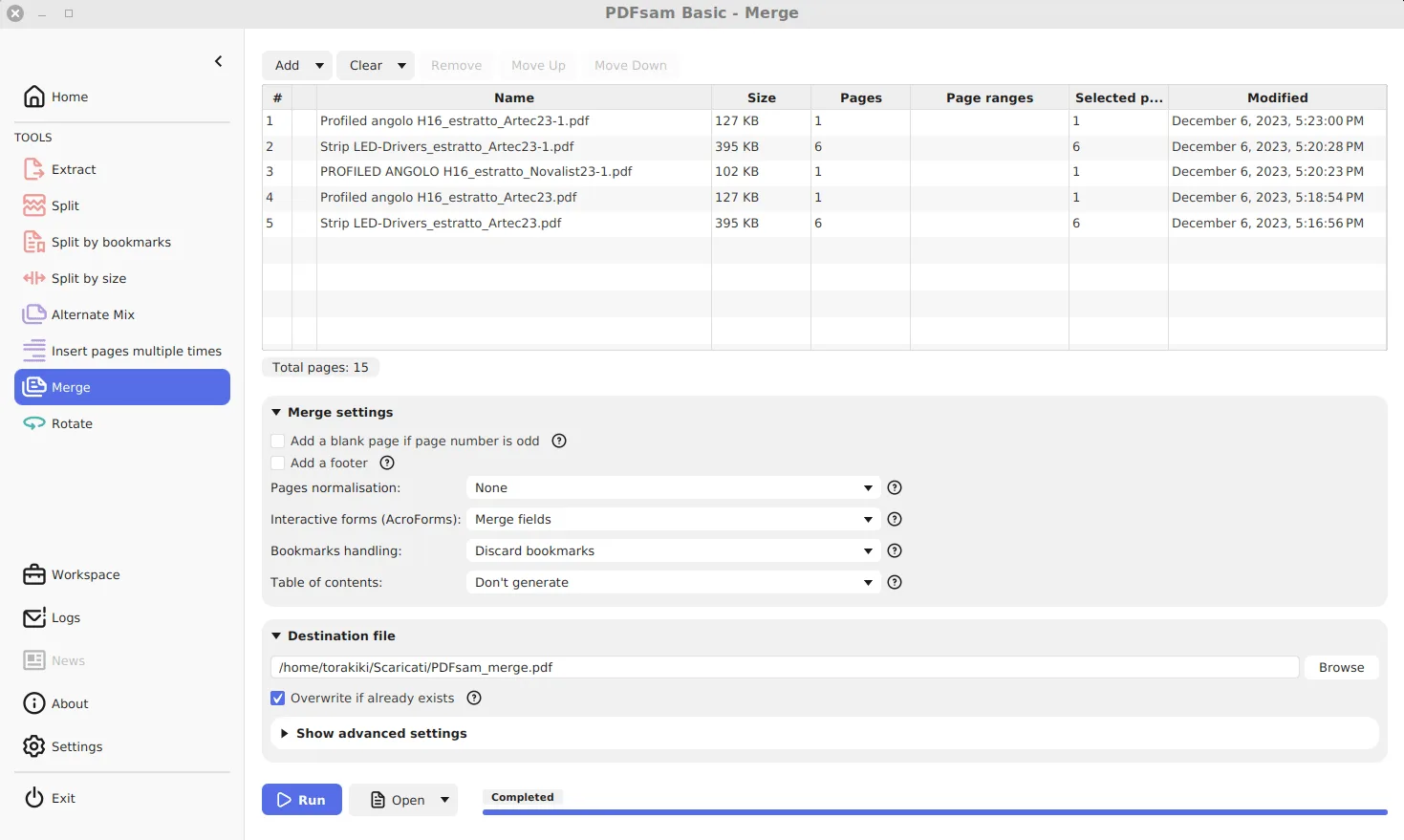
- Merge two copies. Open Merge, drag two PDF copies into the list, set the order with Move Up and Move Down, choose a destination file and click Run. The bar reads Completed when the file is written.
- Split or extract. Try Split with Split after the following page numbers, or Extract with a range such as 2-4. New files get the PDFsam_ prefix, and the originals are never changed.
- Check the output. Open each output in your normal PDF reader and check the first and last page. Keep the originals until the new files look right.
Two habits keep PDFsam Basic useful after the first hour. Save outputs next to the originals for the first week, so you can compare them side by side. And update through the same route you installed with, winget, Homebrew or apt, so there is only one copy on the machine.
Where should you go next?
- Merge PDF files with PDFsam Basic
- Split a PDF by pages, bookmarks or size
- Extract pages into a new PDF
- Turn off update, news and premium prompts
- Check the download is genuine
- All guides
Frequently asked questions
My download did not start. What now?
Use the button above for your system. It links straight to the v6.0.5 file on the official GitHub release. If your browser blocks it, open the release page and pick the file whose name matches the one shown.
Do I need an account for PDFsam Basic?
No. PDFsam Basic has no sign-in and no cloud step. It asks for nothing except the files you add, and its only network use is the optional startup checks for updates, news and premium feature cards.
How do I know the file is genuine?
It came from github.com/torakiki/pdfsam, release v6.0.5, published August 5, 2026. Each file has a SHA-256 on the download page and a detached .asc signature on the release, and winget checks the same hash before installing.
Why does the app mention Visual and Enhanced?
Those are the publisher's paid PDFsam editions, which add editing, OCR, conversion and compression. PDFsam Basic stays free and open source; turn off Show premium features in Settings to hide the cards.
Is there a version for Mac or Linux?
Yes. The same GitHub release carries DMGs for Apple silicon and Intel Macs, a .deb for Debian and Ubuntu, and a tar.gz for other Linux distributions.